Showing posts with label movies. Show all posts

Wednesday, May 13, 2009

All-time great sci-fi movies of the videotape era

When it came to figuring out what to do with my life, there never really was any doubt about what I’d become—an engineer. I remember the numerous times I stoically opened those steel wind-up alarm clocks, to see what made them tick, or took apart music systems (even my VCR, when I was all of 10 years old, to find out how to un-jam that tape!). Needless to say, not all of these exploits were successful—in fact, most were outright disasters. Over the years, I left behind a sizeable wake of cannibalized motors from toys, wrecked stereo systems, and bed sheets that bore scars from trysts with 240-volt electricity (yes, there was the time I nearly got a nice domestic fire going—and we didn’t have a fireplace).

Sure I had my fair share of chastising, but through it all mum and dad did all they could to ensure that I had a steady supply of science and technology influences throughout my formative years—from the junior microscope sets, to telescopes, to electronic do-it-yourself kits. I was, indeed, blessed.

But when it came to igniting a spark of interest in the budding scientist in me, the biggest influencers had to have been movies—I believe the 80s produced some of the most spectacular science fiction movies ever created. Looking back, the fact that the special effects were nowhere as advanced as today’s productions did in no way detract the sheer innovation and soul that characterized many of those movies. Being the era of VHS (where copying was cumbersome and downloading was out of the question), every movie was treasured, and the act of watching it was a family affair, often followed by hours and days of animatedly discussing, dissecting and reliving the storyline.

In no particular order, here’s a list of what I believe are some of the greatest sci-fi movies of the videotape era. If you ever get a chance to watch any of these, I guarantee that they’ll be pure, family entertainment. And if you have a budding techie sitting on the couch in your living room, (s)he’s bound to have great memories of them in the years ahead.

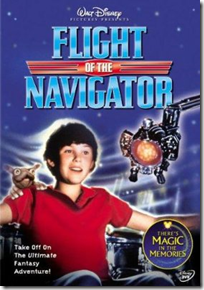
Flight of the Navigator (1986)
A fascinating story about a UFO that selects and befriends a boy to help it get back home. I still think that this is one of the most amazing-looking UFOs ever shown on celluloid. Period.
FlightOfTheNavigator
D.A.R.Y.L. (1985)
Another movie that centers around a young boy, who’s the subject of NASA experiments that make him hyper-intelligent. And the best part of this movie (spoiler alert ahead!)—in the end he flies a Lockheed SR-71 Blackbird—my favorite aircraft, bar none!
DARYL
TRON (1982)
Conceptually, this movie was way ahead of its time—a computer geek gets mysteriously transported into a computer, and must battle his way to get out alive—by fighting against its games, one on one! This movie had one of the most spectacular effects of its time, and the action sequences (on those bike thingies, especially), were awesome!
BTW: TRON was a function used in good ol’ programming languages like BASICA, meaning TRaceON—it was used for debugging!
TRON
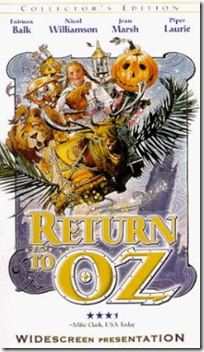
Return to Oz (1985)
If you liked the Wizard of Oz, you’re bound to love this movie. This isn’t a happy, bouncy continuation of the original, but instead puts Dorothy and her band of misfits in a darker, more sinister realm. Fascinating story, great characters.
ReturnToOz
Return of the Jedi (1983)
Which geek doesn’t revere this movie? This was actually the first Start Wars episode I watched, and I instantly fell in love with every aspect of it. After this movie, there was no looking back from Han Solo, the Light Sabres, and Vader.
ReturnOfTheJedi
Short Circuit (1986)
A charming movie about a battle robot that takes on human characteristics after a close encounter with a lightening bolt. Besides looking downright cute in its own right, this robot is actually quite evocative of our modern-day Wall-E.
ShortCircuit
Back to the Future (1985)
A sports car that doubles up as a time machine, hover skateboards, and a host of other cool gadgets—ingredients for one rocker of a sci-fi movie! Because of this movie, the gull-wing DeLorean was one of my favorite sports cars at the time. Arguably one of Michael J. Fox’ most memorable roles, this is one of those must-see, must-own pieces of cinemagic!
back_to_the_future
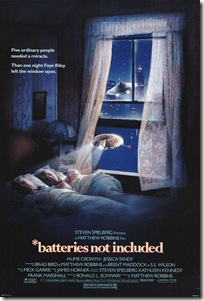
*batteries not included (1987)
Looking back, I think this is a grossly underrated movie—it’s a story about an adorable pair of extra-terrestrial robots that ‘adopt’ a tenement-full of misfits. A brilliant story, and great visual effects.
batteries_not_included
E.T.: The Extra-Terrestrial (1982)
Spielberg’s magnum opus. ‘nuff said.
ET
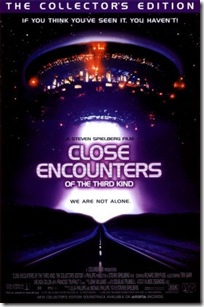
Close Encounters of the Third Kind (1977)
Answering all those questions surrounding aliens and UFOs, this movie was a complete eye-opener, and a visual tour de force of its time.
Close Encounters of the Third Kind

All images sourced from www.imdb.com

Sunday, February 1, 2009

DVD Flick: Converting videos to DVD

Ever needed to convert a whole lot of videos into a DVD? Here's a handy little tool that enables you to do just that: pop in a blank DVD, point the application to one (or more) videos on your hard disks, configure a few basic settings and boom--you have a DVD that will play on any conventional player. DVD Flick is especially useful for converting DivX movies into DVD format (great for sending movies to your mom who has an older DVD player, or for compiling and distributing video clips recorded on your digital camera).

DVDFlick DVD Flick is one of those ultra-handy Open Source applications that do a fantastic job of serving a specific requirement quickly and efficiently. Creating a DVD with this application is child's play. Start by downloading the program from here. After installing it, click the Guide icon on the top and you'll see a quick and easy run-through for creating a DVD. You can create a regular DVD in just a few clicks, with the default program settings. But you can also customize your DVD with additional audio tracks (such as director commentaries) and subtitles. You can add several videos in a given title, and the application will figure out how best to encode them to fit on a single DVD. You can choose between the single-layer DVD-5 format (4.7GB), the dual-layer DVD-9 format (8.54GB), or even the more exotic Mini-DVD (1.35GB or 2.47GB) formats. Of course, you will need the appropriate type of blank DVD to hold a given project. When creating a compilation of videos, you can even create an interactive menu that enables you to navigate your disk and select files during playback--much like the main menu of a conventional movie DVD.

DVD Flick will create a DVD from virtually any type of video file you might want to throw at it (it supports for over 70 video formats), including FLV, DivX, TrueHD, H.264, Apple Video and many more. See here for a complete list of audio and video codecs this versatile application supports.

Based on the powerful FFMPEG video processing engine, this is a processor-intensive application. So the time it takes to create a project will depend on your computer's horsepower. Fortunately, it supports and even detects multi-core processors--a definite advantage if you plan to use this program for a serious amount of DVD creation. Finally, you can use the program's built-in DVD burning capability, or have the application write the files to your hard disk where you can subsequently create your DVD using your favorite DVD burning application. Simple and fun!

Friday, October 17, 2008

Manage those movies

Filmreel These days we are pampered for storage space. With game-changing inventions like perpendicular recording, hard disks have comfortably hit the terabyte mark. Add to that, smarter manufacturing processes have driven down costs to the 15-cents-per-gigabyte level! Inevitably, the urge to fill these digital storehouses kicks in, and it isn't long before we find ourselves throwing in movie files that weigh in at a few gigabytes, or copying hundreds of MP3s--all of which quickly eat up those gobs of storage space. The answer to this? Add more storage space of course. It's so cheap, after all.

But there's a bigger concern here--bringing some semblance of order and sanity to all those media files. Let's talk about movie files--the good old DivX format can compress a movie  while keeping the audio and video quality surprisingly close to the original DVD. Little wonder that DivX (or XviD) movies are so popular these days. Of course, movie piracy is illegal. But you already knew that, right? With that mandatory warning out of the way, let's talk about managing these DivX movies.

ANT movie catalogYou will find several tools (both commercial and freeware) that can help bring order to your ever-expanding movie collection. These applications typically let you catalog your movies, download descriptive information (actors, director, release year, review, cover artwork and more). After cataloging your movies, you can search, query, or export the listing. Some cataloging applications even help you track rentals, so you'll always know where your movie DVDs are. You can even catalog your movies across different media--DVD, DivX and even VHS or Blu-ray. I've tried several applications, but have had the best experience with ANT Movie Catalog. This is a capable, feature-rich software that has all the capabilities listed above, and then some. And it's free.

Once you install and start the software, you'll pretty much see a blank interface. That's because you'll first need to add movies to your database. Here's the quickest way to do this.

  1. Press 'ALT+Ins' to create a new movie entry.
  2. Locate the DivX movie file on your hard disk, and drag-and-drop this file into the main program interface. The application reads the video information (resolution, running time, resolution etc) and populates the relevant fields in the new record.
  3. In the 'Original Title' field (the fourth field from the top), type in the title of the DivX movie you just added.
  4. Next,  press the 'F6' function key. This opens the scripting dialog box. Locate the 'IMDB' script. Never mind the many others: IMDB should suit your needs fine. Hit 'Enter'. Verify that the movie name is typed correctly, and hit 'Enter' again. If you're connected to the Internet, the program will pull down the relevant movie information. If it finds duplicate movie names, you can select the correct one.
  5. After the import is finished, you will see all the corresponding movie information in the respective fields. Now hit 'CTRL+S' to save your updated database. I save my database in the XML format, and store choose to store movie artwork as separate files. You will see this option while saving.
  6. By default, new movies are added to the bottom of the list. You can re-sort your movie list by name. Do this by clicking 'Tools', then 'Renumber'. Select the mode of sorting ('Original Title' works best), and hit 'Ok'.

There is no direct way to import several movies into the ANT catalog at one go. However, you can use the technique described here to achieve this result. Use this method to import all your DivX movies the first time you use ANT. Be sure to check out this application's other cool features in the 'Tools' section, such as the Statistics and Loans.

Related Posts with Thumbnails